


✈️ Introduction: Why Google Flights Is a Game-Changer
If you’re serious about finding a flight ticket cheap deal, one tool stands above the rest: Google Flights. It’s fast, flexible, and packed with powerful features most travelers never fully use. In this guide, you’ll learn how to use it like a pro—and take your Budget Flight Mastery to the next level.
🧠 What Makes Google Flights So Powerful?
Unlike many booking platforms, Google Flights:
- Searches multiple airlines instantly
- Shows flexible date pricing
- Highlights the cheapest options
- Offers powerful filters and maps
👉 It’s not just a search engine—it’s a strategy tool.
🔍 Step 1: Start With a Flexible Search
Instead of locking in dates right away:
- Enter your departure city
- Leave destination blank or flexible
- Choose “Explore”
This is one of the best budget travel hacks.
🌍 Step 2: Use the Explore Map
The Explore feature lets you:
- See flight prices worldwide
- Discover cheap destinations
- Filter by budget or travel dates
💡 Tip: This is perfect if your goal is “Where can I go cheap?”
📅 Step 3: Use the Date Grid
Click on your travel dates to open:
- Calendar view
- Date grid pricing
You’ll instantly see:
- Cheapest days to fly
- Price differences across dates
👉 This is one of the fastest ways to find a flight ticket cheap option.
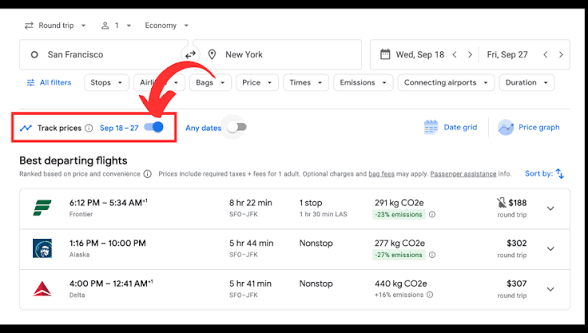
🔄 Step 4: Track Prices
Don’t book immediately—track first.
- Toggle “Track prices”
- Get email updates
- Monitor trends
This removes guesswork and helps you book at the right time.
✈️ Step 5: Filter Like a Pro
Use filters to refine results:
- Stops (nonstop vs layovers)
- Airlines
- Price range
- Flight duration
- Departure times
👉 Pro tip: Sometimes adding one stop can cut your price in half.
🧳 Step 6: Check Baggage Details
Google Flights now shows:
- Carry-on policies
- Basic economy restrictions
Always check this to avoid surprise fees.
💡 Step 7: Mix and Match Airlines
Google Flights often suggests:
- Different airlines for each leg
- One-way combinations
This can unlock cheaper routes than traditional roundtrip bookings.
🚀 Step 8: Book Smart (Important!)
Google Flights doesn’t sell tickets—it redirects you. Best practice:
- Book directly with the airline when possible
- Compare with OTA (online travel agencies) if needed
📊 Pro Features Most People Miss
🔔 Price Insights
Google Flights tells you:
- If a price is “low,” “typical,” or “high”
- Whether to book now or wait
📉 Price Graphs
See historical trends to:
- Understand pricing patterns
- Spot the best time to buy
🛫 Nearby Airports
Automatically compare:
- Alternate departure airports
- Nearby destination airports
👉 Huge savings potential.
🧠 Advanced Google Flights Hacks
🌍 Search One-Way Segments
Break trips into:
- Separate one-way tickets
- Different airlines
🕒 Use Flexible Dates + Alerts Together
This combo is powerful:
- Find cheapest days
- Track price drops
- Book at the lowest point
✈️ Look for Long Layovers (Optional)
Sometimes longer layovers = cheaper fares. Bonus: mini stopover in another city.
⚠️ Common Mistakes to Avoid
- Booking without checking multiple dates
- Ignoring nearby airports
- Not using price tracking
- Choosing convenience over savings without comparing
🔗 How This Fits Into Budget Flight Mastery
Google Flights is one of the core tools in your system. To maximize results, combine it with:
- Timing strategies
- Error fare tracking
- Airline comparisons
- Proven budget travel hacks
👉 Be sure to read the full Budget Flight Mastery guide to connect all the strategies together.
🧭 Final Thoughts
Google Flights isn’t just for searching—it’s for strategizing. If you:
- Stay flexible
- Use the Explore map
- Track prices
- Compare options
You’ll consistently find the best deals and master the art of booking a flight ticket cheap.
✅ Up Next
Hidden City Ticketing Explained (Pros & Risks)